

Introducing Epicweb SEO Manager for Optimizely CMS
Which pages are missing an SEO title or meta description? Epicweb SEO Manager helps you find them, review AI suggestions alongside each page, and save/publish your edits as drafts directly in Optimizely CMS.

You’re getting a group of pages ready for a campaign. The content is in place, but some pages are still missing a meta description. Others have titles that could be shorter or clearer. On a site with several languages, it can take a while just to find the pages that need attention.
Epicweb SEO Manager is part of Epicweb AI Assistant for Optimizely CMS. It gives web editors one place to find metadata issues, review the affected pages, and make changes. Marketing teams can start with the section and language that matter for a campaign, and editors can work through the results page by page.
Epicweb AI Assistant already offers shortcuts for individual SEO fields and an AI Chat that can review content or compare language versions. SEO Manager adds a dedicated workflow for reviewing metadata across a group of pages. See how we’ve been working with SEO in Epicweb AI Assistant.
Find the pages that need attention
Open SEO Manager from the AI Assistant menu. Choose a site and language, then narrow the scan to a branch of the page tree or a specific page type if needed. Click Find pages to check the configured SEO fields.
In the Alloy example below, the scan checked 29 English pages and found SEO issues on 15. The About us page has a meta description of 179 characters, and Become a reseller has an SEO title of 104 characters. Select Show only pages with issues to focus the list on pages with flagged fields.
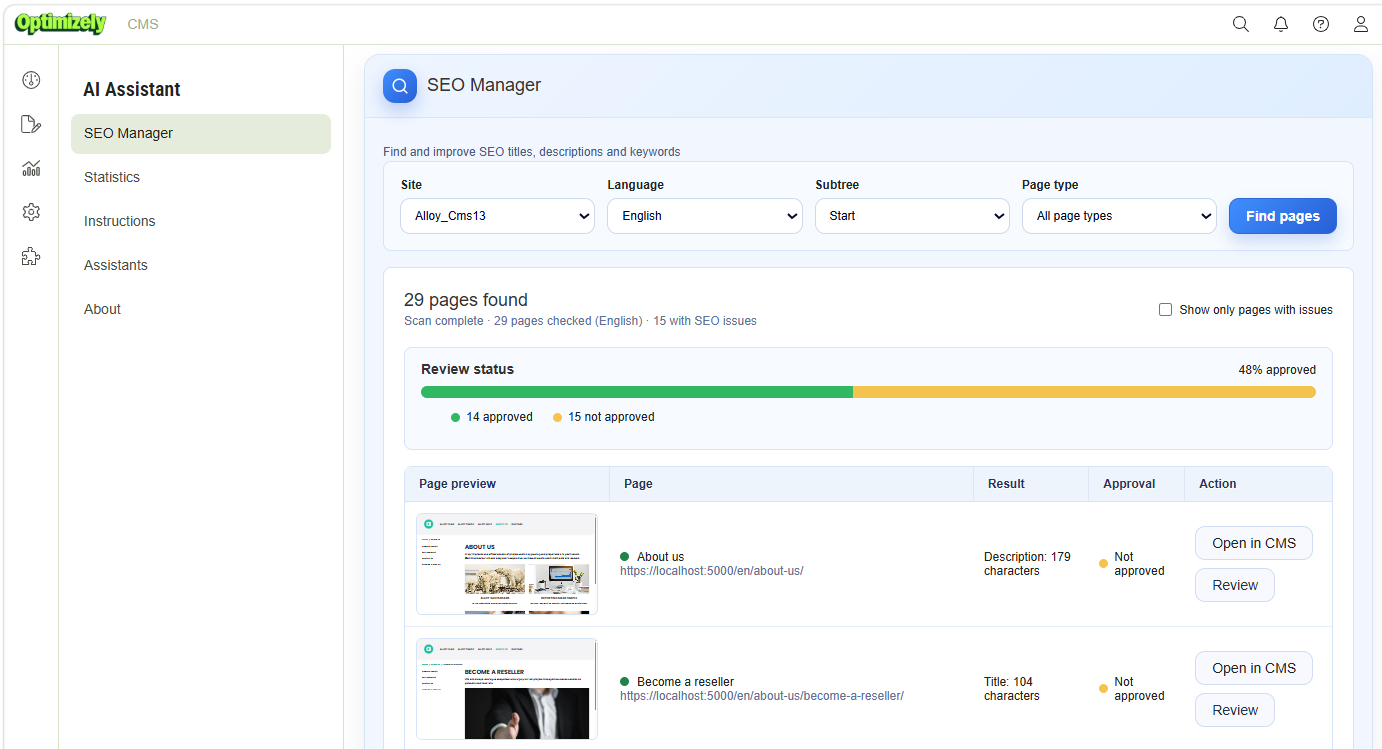
The scan results show what was checked, which fields need attention, and the review status of the pages in the list.
Review metadata with the page in front of you
Click Review to open a page. The preview is on the left, with the current metadata and editable draft fields on the right. You can read the page, check what its title and description say, and use Previous or Next to move through the list.
That side-by-side view makes a small but important difference. When you change a description, you can check whether it captures what a reader will actually find on the page.
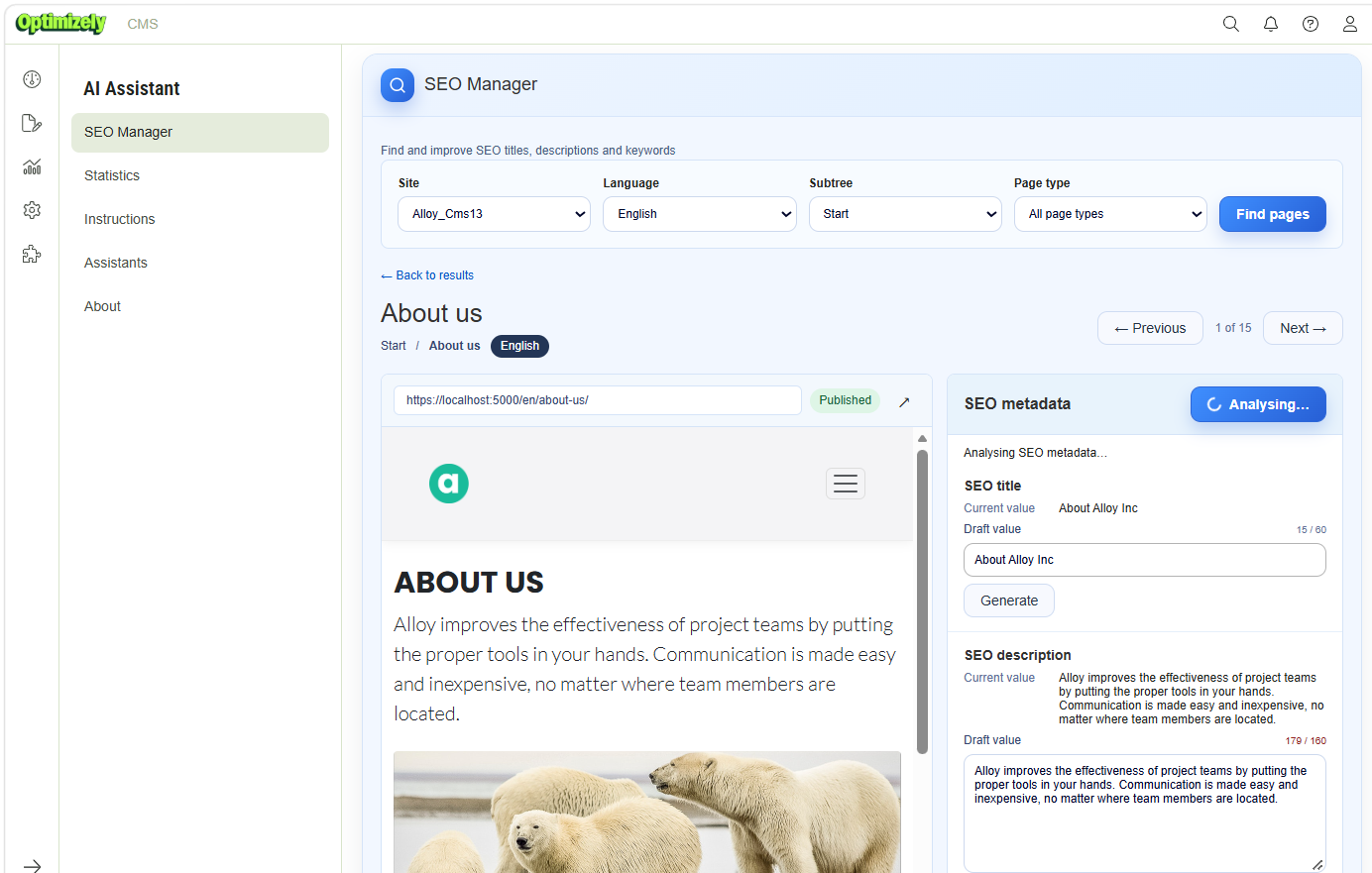
The English About us page is open in the review view, with the page preview on the left and the SEO fields on the right.
Use AI where it helps
Select Analyse and suggest to review the configured fields using the page content and existing metadata. You can also use Generate or Regenerate to work on one field at a time. The AI explains its recommendation, which helps you decide whether the change makes sense.
On the Alloy About us page, the AI says the existing title, About Alloy Inc, is clear and fits the page. It suggests shortening the 179-character description while keeping the main point about how Alloy helps project teams communicate.
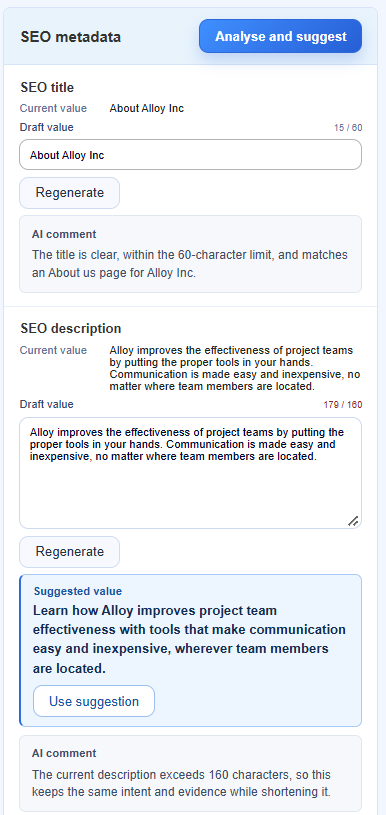
The AI recommends keeping the existing title and explains why it proposes a shorter description. Use suggestion copies the proposed text into the draft field.
You can edit the suggestion before clicking Save draft. If you’ve checked a page and are happy with its metadata, you can mark it as reviewed and move on.
Set up SEO Manager for your site
Developers can enable SEO Manager in the Epicweb AI Assistant settings and map the site’s existing SEO properties with [SeoField]. Teams can also customize the AI instructions by language so that suggestions use the right product names and wording for each market. The setup guide covers field mapping, access, and configuration. Read the Epicweb SEO Manager documentation on GitHub.
FAQ
What does SEO Manager check?
It flags missing values in mapped SEO title and meta description fields. It also flags titles longer than 60 characters and descriptions longer than 160 characters. These are the thresholds SEO Manager uses to surface pages for review.
Does the scan check draft or published content?
It checks the common draft for the selected language when one exists and uses the published version as a fallback.
Can I use SEO Manager on a multilingual site?
Yes. Choose the language you want to scan, then review those pages in that language. AI suggestions are written in the language of the page you’re reviewing.
Do I need AI Chat to use SEO Manager?
You can use SEO Manager with AI Chat turned off. The scan checks the mapped fields locally. Generating suggestions requires a configured AI provider.
Who decides what gets published?
The editor chooses which suggestions to use and when to save a draft. Users with publish permission can publish a saved draft from SEO Manager once that language version has been published at least once in Optimizely CMS.
Boka ett möte för att komma igång!
Vi erbjuder ett timmes introduktionsmöte om vår AI-assistent för Optimizely CMS 12. (Svenska eller engelska)
AI-assistenten: Det här får du
Funktionsrik för ökad redaktionell effektivitet
Epicwebs AI-assistent har en imponerande mängd funktioner:
-
Textförslag och alternativ: Förbättra ditt skrivande med AI-genererade formuleringar och alternativa varianter.
-
Flerspråkig översättning: Översätt din text sömlöst till flera språk samtidigt som formattering och stil bevaras för att nå en mångsidig publik.
-
SEO, AEO och GEO: Generera optimeringsinnehåll för sökmotorer och AI-sökning.
-
Prompt Pro Assistance: Det sparar tid och hjälper dig få mer ut av dina idéer, omedelbart.
-
Bild AltText-analysator: Avancerade AI-funktioner för att analysera bilder och automatiskt fylla i medieobjektsegenskaper.
-
Bildgenerering: Skapa relevanta och engagerande bilder som kompletterar ditt innehåll.
-
Bildtransformer: Ta vilken bild som helst, förbättra den och lägg till nya element med AI-driven kreativitet. Förändra sättet du interagerar med bilder.
-
Ny textgenerering: Generera nytt innehåll som håller din publik engagerad.
-
Textsammanfattning: Snabbt kondensera långa texter till koncisa sammanfattningar, spara tid och behålla essensen, perfekt för SEO-beskrivningar.
-
HTML-formatering: AI-assistenten erbjuder en rad formateringsmöjligheter inom Rich Text Editor. WCAG-kompatibel.
-
Stavningskontroll: Säkerställ att ditt innehåll är fritt från fel och professionellt polerat.
-
Tonaljustering och konsekvens: Anpassa din texts ton för att passa ändamålet och bibehålla en konsekvent varumärkesröst.
-
Nyckelordsutvinning: Identifiera och extrahera nyckeltermer från din text för SEO-optimering.
-
Anpassade uppmaningar med ChatGPT: Utnyttja kraften i ChatGPT för att köra egna uppmaningar för unik innehållsskapande.
-
Anpassade genvägsuppmaningar: Lägg till egna genvägar för frekvent använda kommandon, koppla verktyg och öka produktiviteten.
-
Inline ChatGPT-hjälp: Använd ChatGPT eller Google GEMINI direkt inom plattformen för omedelbar hjälp.
-
Verktyg för AI: Anslut dina C# Funktionsanrop eller MCP-verktyg direkt till AI-assistenten, vilket möjliggör anpassade integrationer.
-
RAG (Retrieval-Augmented Generation): Anslut din egen kunskapsbas för AI-svar som drivs av din organisations interna data.
Smidig integration i Optimizely
AI-assistenten är sömlöst integrerad i varje fält inom Optimizely CMS och Commerce-plattformen, vilket säkerställer att dessa kraftfulla funktioner är tillgängliga precis där du behöver dem, i redigerarläget.
Kom igång med Epicwebs AI-assistent:
För att komma igång med den kostnadsfria utvärderingen, fyll enkelt i formuläret på vår webbplats för att komma igång och ladda ner tillägget till din Optimizely CMS och anpassningsbara Commerce-plattform från Optimizely Nuget-feed.
Följ vår nybörjarvänliga guide eller dyka djupt med vår omfattande dokumentation.
Installation är snabb och enkel, vilket gör att du kan börja utnyttja kraften i AI-assistans på nolltid.
Boka ett möte för att komma igång!
Vi erbjuder ett timmes introduktionsmöte om vår AI-assistent för Optimizely CMS 12. (Svenska eller engelska)
Notera: Detta blogginlägg har förbättrats med hjälp av AI-assistenten för Optimizely.
Beräkna dina besparingar
Använd vår kalkylator för att uppskatta din potentiella besparing baserat på ditt innehåll och ditt redaktionella arbetsflöde.
AI-assistenten i Optimizely ökar din produktivitet och frigör tid, se filmen:
About the Author