

News in AI Assistant for CMS: Assistants, Instructions and Statistics
We are introducing three new features for AI Assistant in Optimizely CMS. They make it easier to reuse AI expertise, work faster and understand how AI is being used across your website.

2min video featuring AI Assistants and Quick Instructions
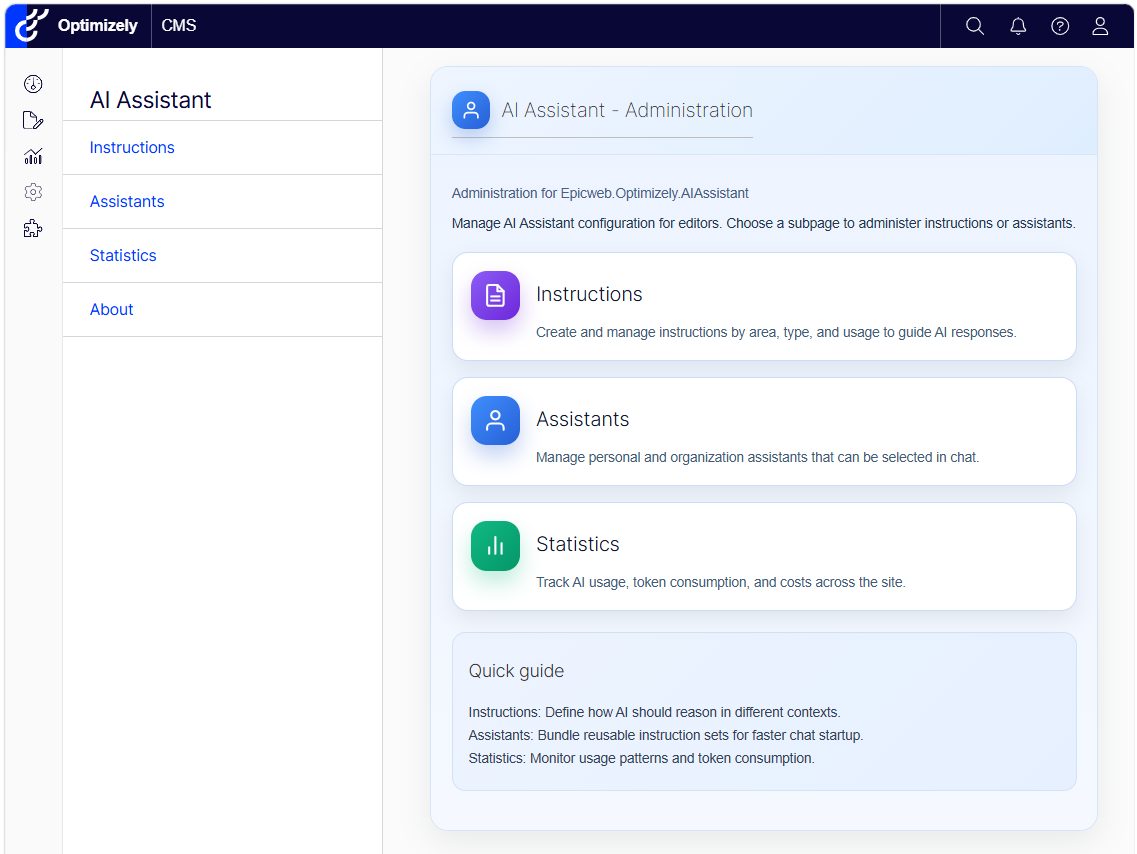
Administration: Everything in one place
The new Administration area provides one place to manage AI Assistant in Optimizely CMS.
Administrators can quickly access:
- Instructions to create and manage reusable AI guidance
- Assistants to manage specialized experts for different tasks
- Statistics to monitor AI usage, token consumption and estimated costs
The clear overview and quick guide make it easier to configure AI Assistant and support editors across the organization.
Assistants: Experts for different tasks
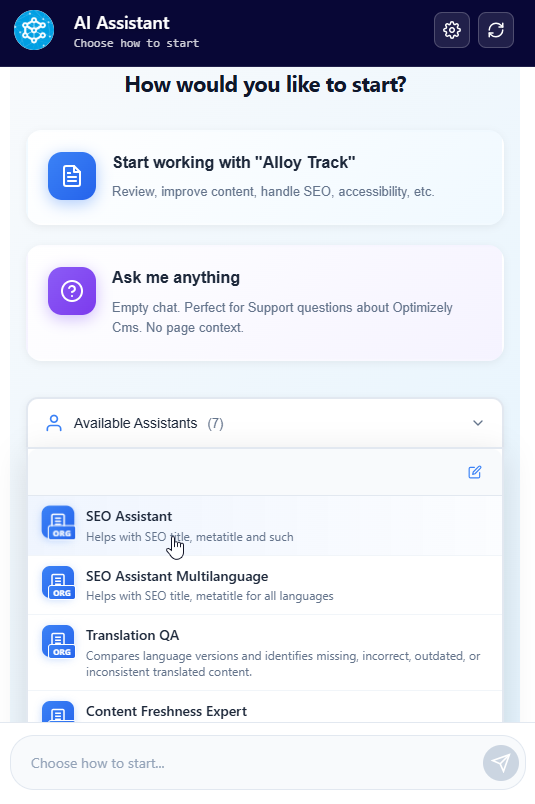
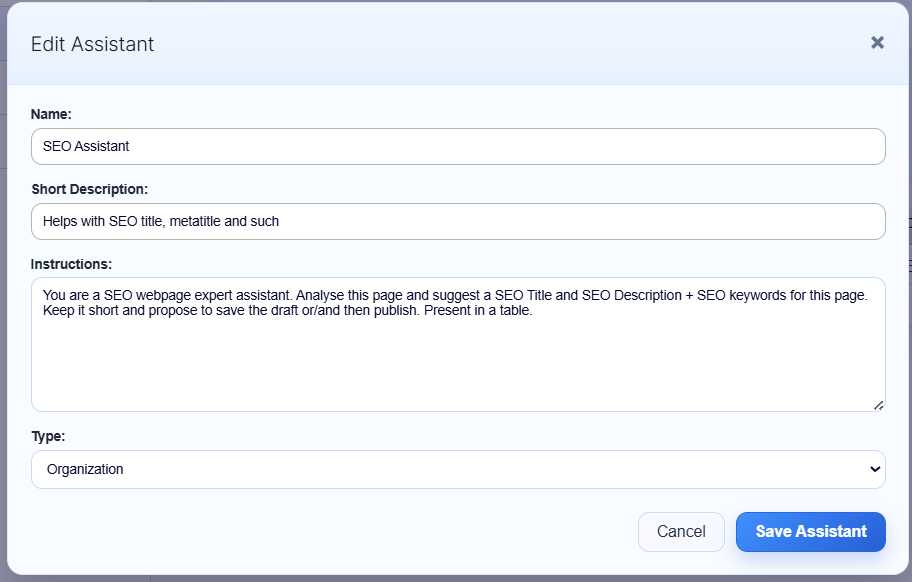
You can now create specialized AI Assistants for common editorial tasks.
Each Assistant has its own name, description and instructions. For example, you can create Assistants for:
- SEO optimization
- Translation quality
- Content freshness
- Brand voice
- Content quality
- Accessibility and WCAG
Editors can select an Assistant when starting a chat. The Assistant receives the current page as context and is ready to work on its specific task.
Assistants can be available to the whole organization or created for personal use.
Instructions: Reusable shortcuts in chat
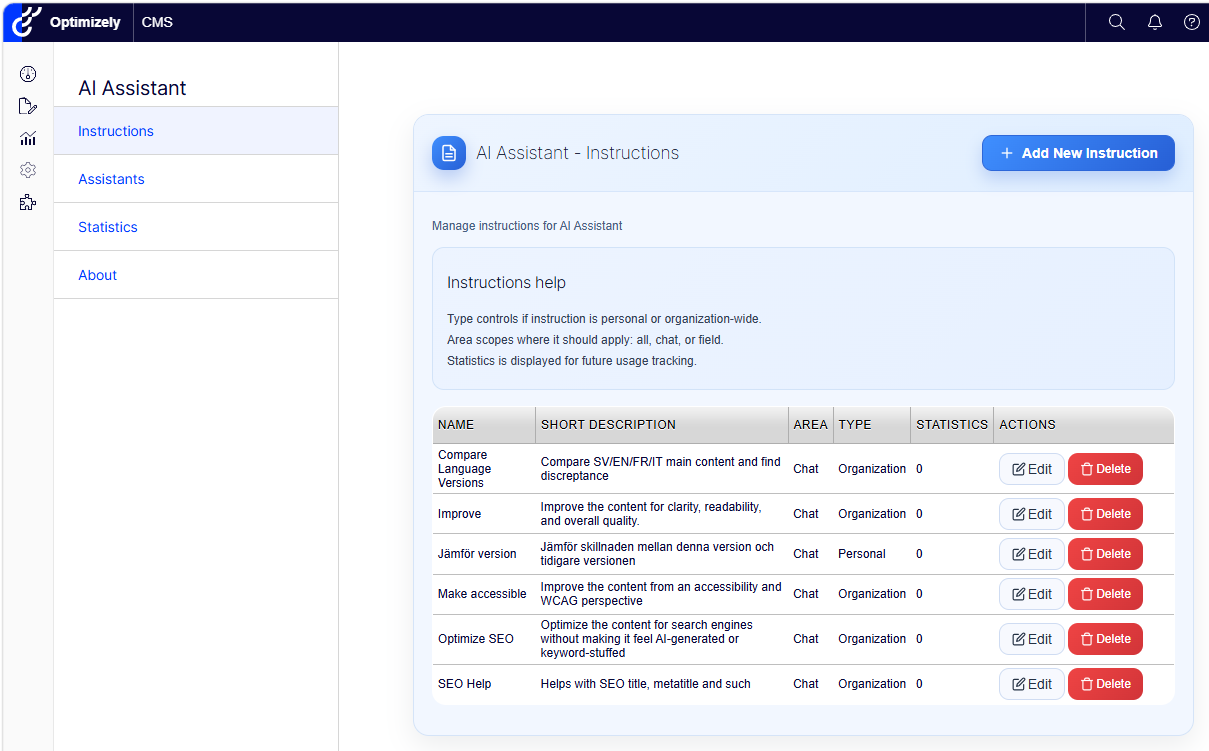
Instructions are reusable prompts that help editors complete common tasks faster.
Simply type / in the chat to open the list of available Instructions. Select one, and the prepared instruction is added to the input field.
Instructions can be used for tasks such as:
- Improving content
- Optimizing SEO
- Checking accessibility
- Comparing language versions
- Following specific writing guidelines
They can be personal or shared across the organization. Administrators can also control where each Instruction is available, such as in the chat, in content fields or throughout AI Assistant.
This gives editors consistent results without having to write the same prompt every time.
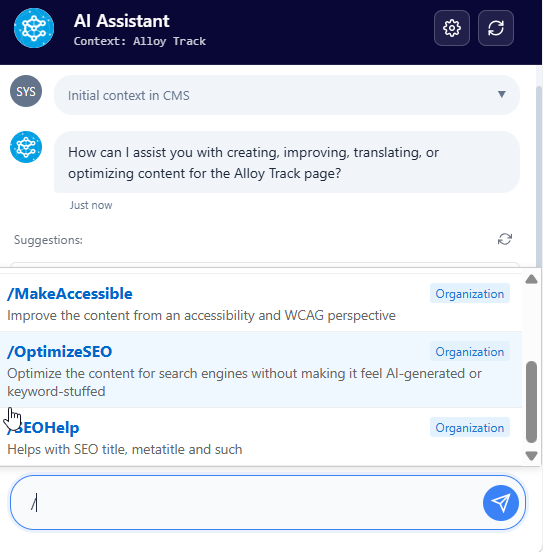
Using the / shortcut to quickly select an Instruction in the chat.
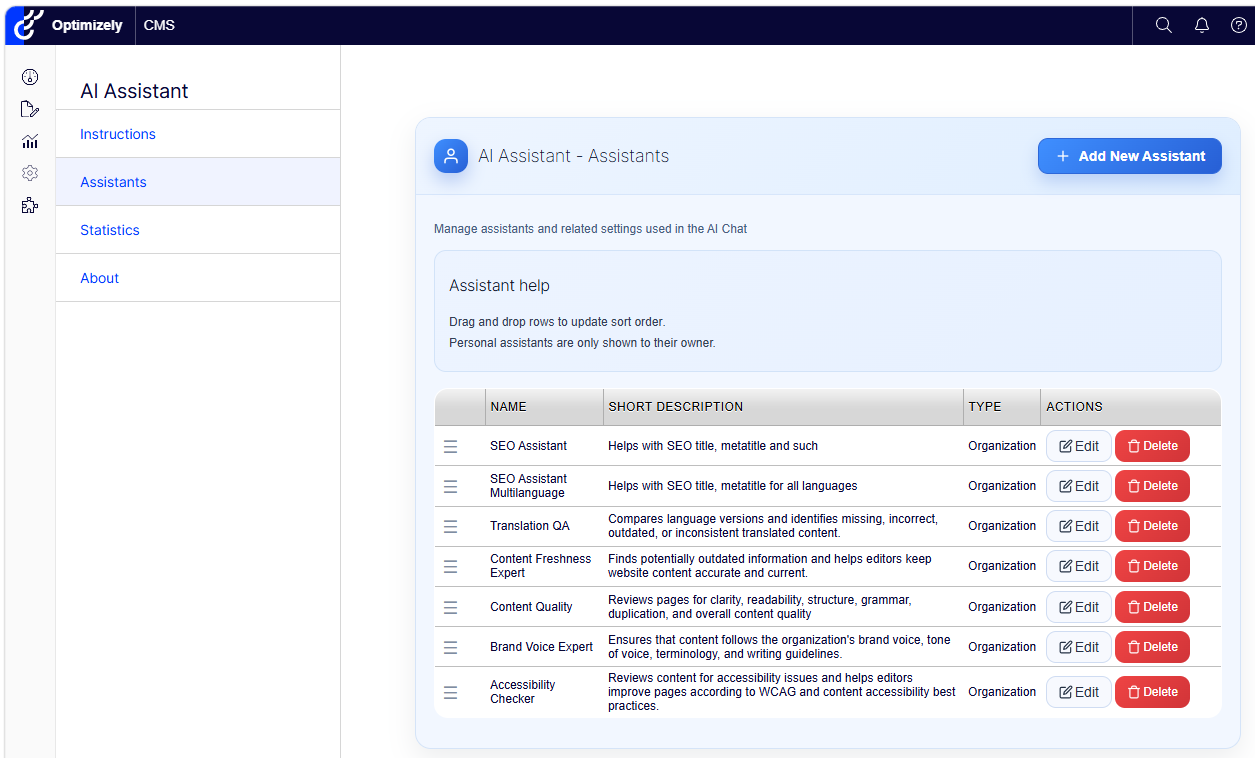
Admin Overview of reusable Instructions available to editors.
Statistics: Understand AI usage and cost
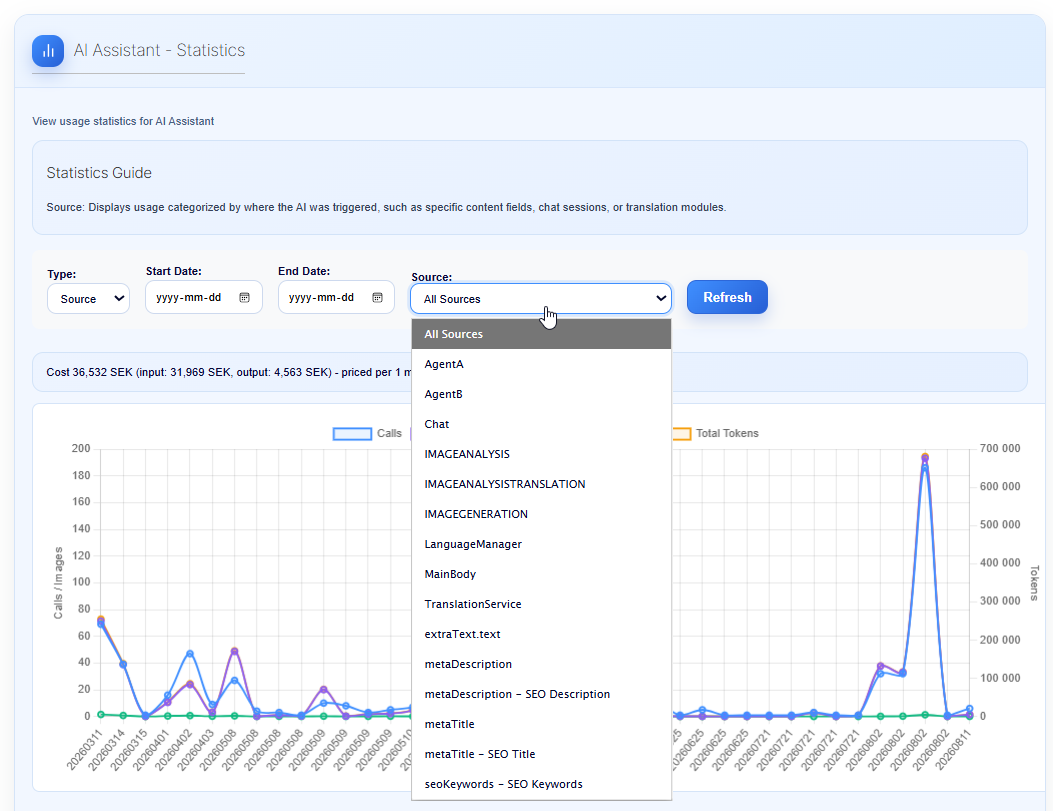
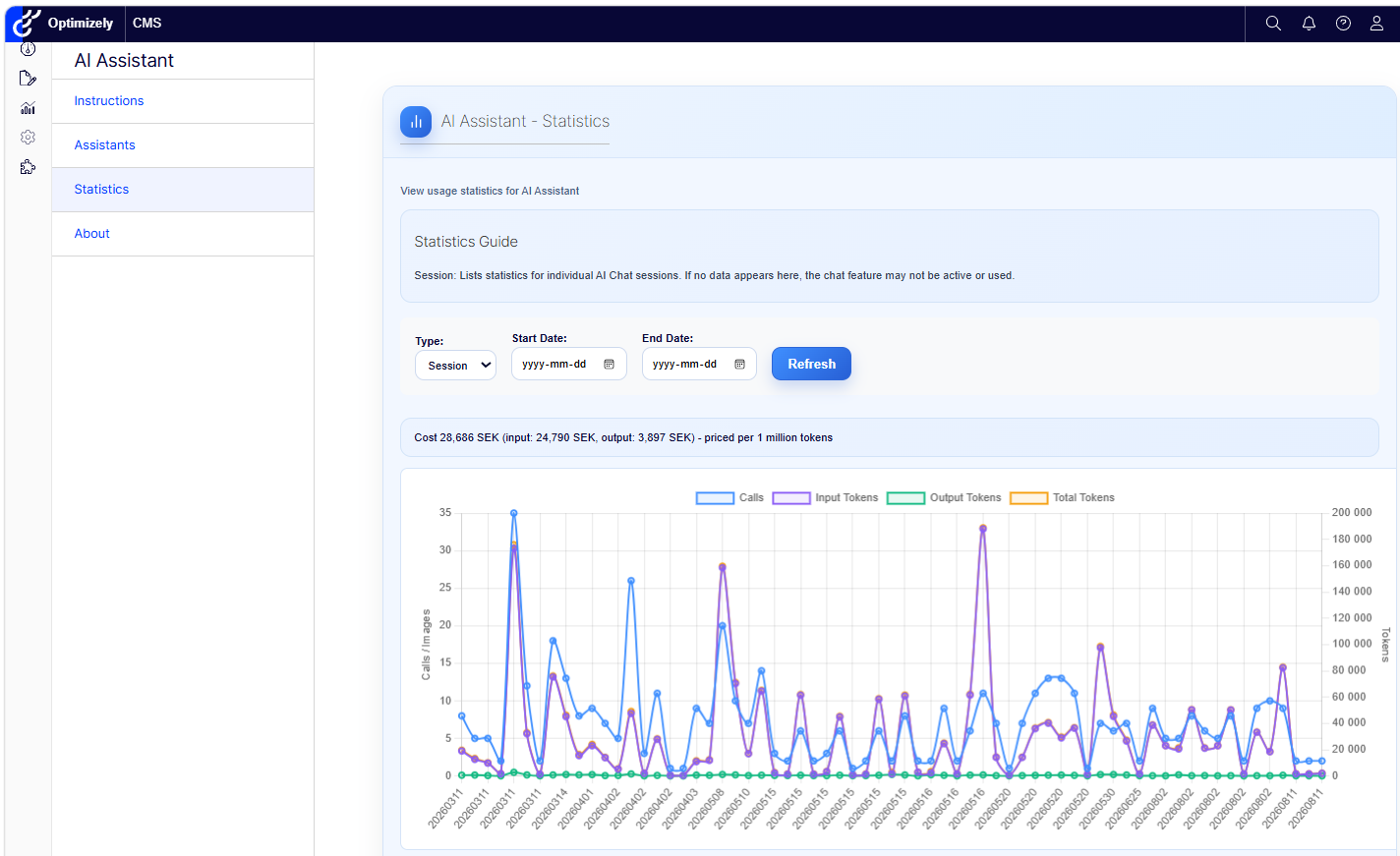
The new Statistics view provides a clear overview of how AI Assistant is being used.
You can track:
- Number of AI calls
- Input and output tokens
- Total token usage
- Estimated cost
- Usage by date
- Individual chat sessions
- Usage by feature or content field
Filter the statistics by date, source or reporting type. View the total usage, follow daily activity or explore individual sessions.
This makes it easier to understand adoption, identify usage patterns and keep track of AI costs.
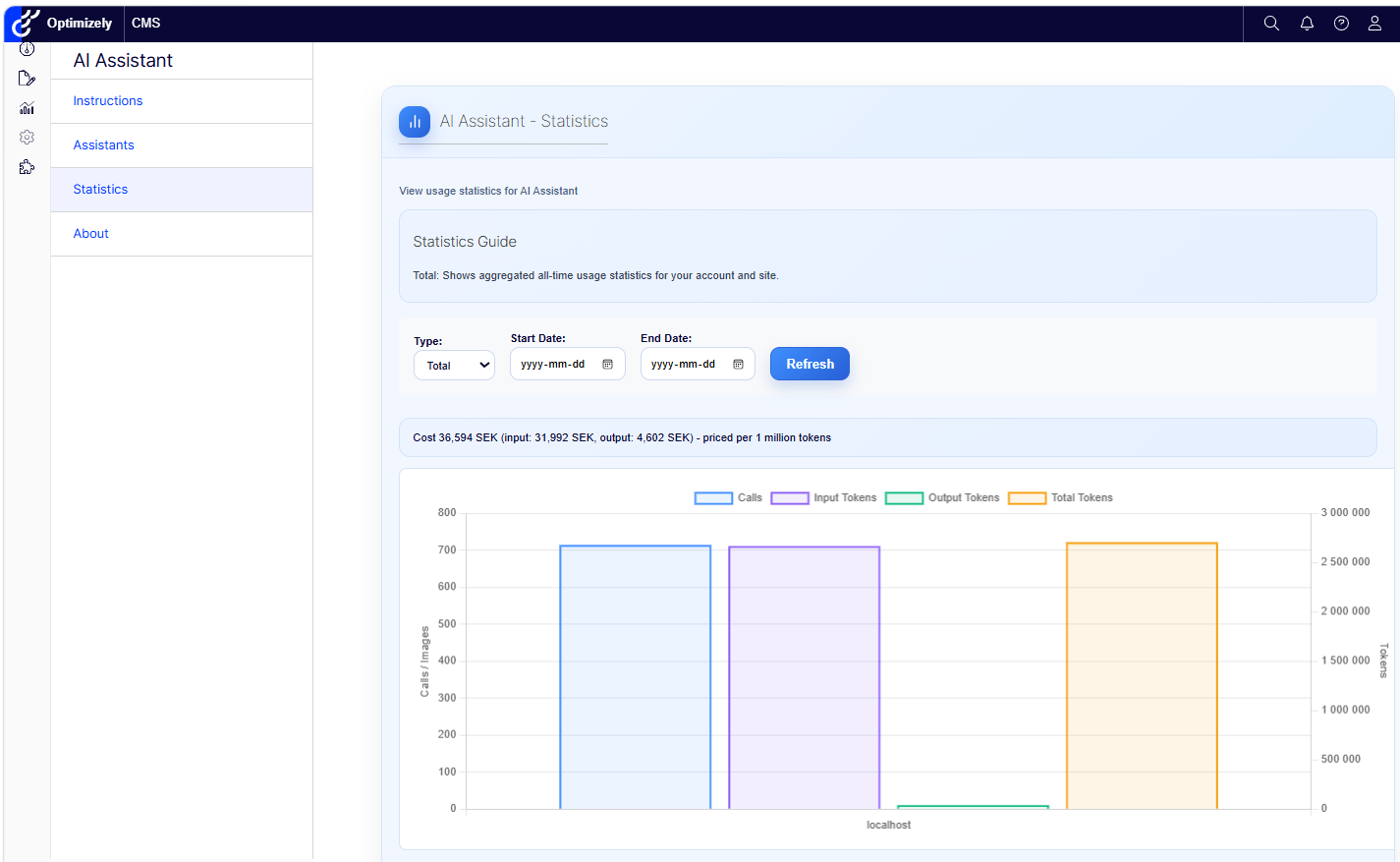
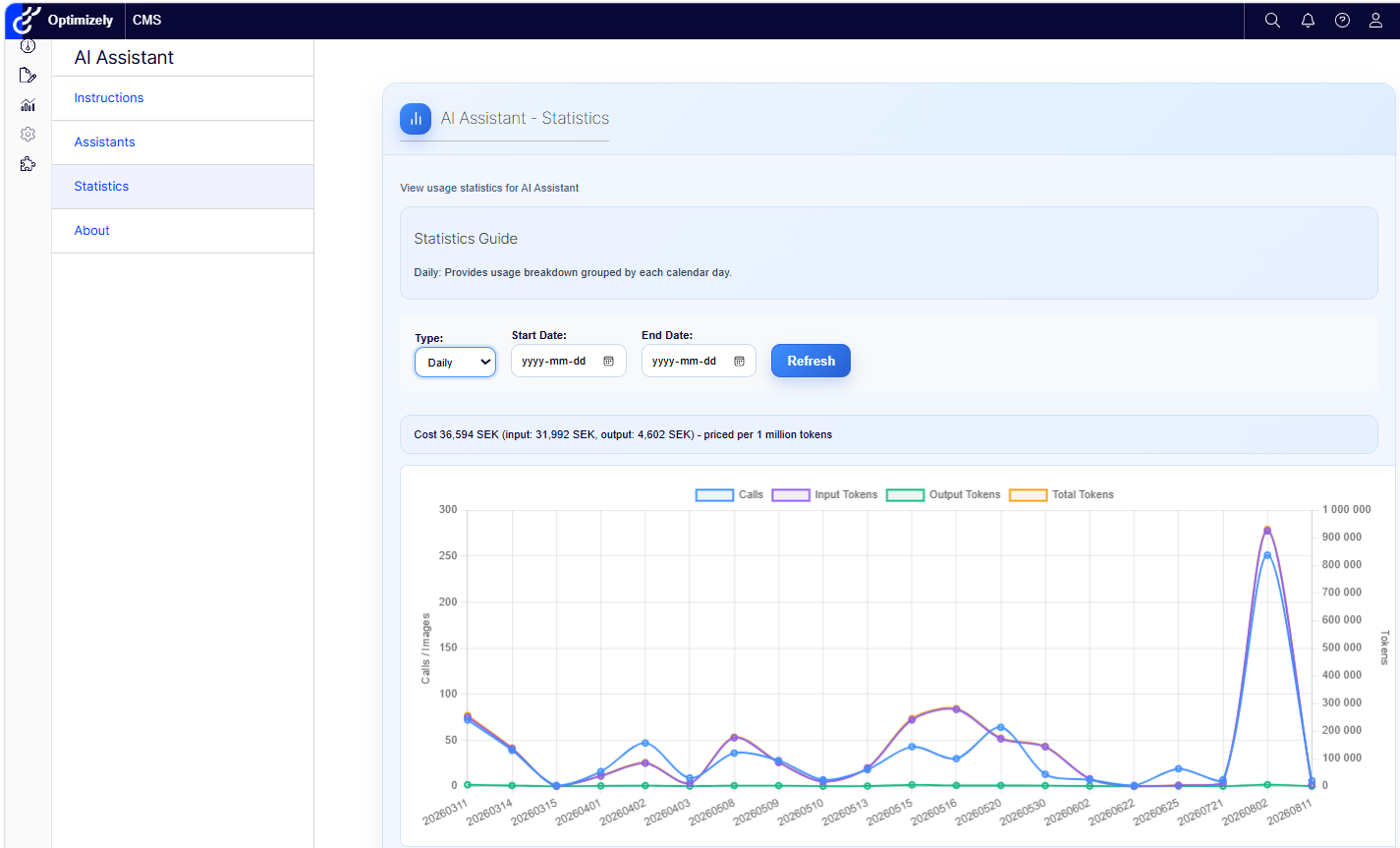
Cost Settings
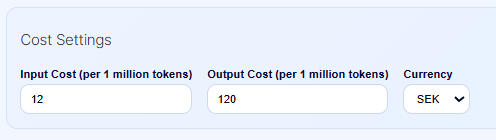
The Cost Settings allow administrators to enter the current input and output token prices for the selected AI model and currency. These values are specified per one million tokens.
This is needed because AI providers and models have different prices. The settings allow AI Assistant to calculate and display more accurate estimated costs in the Statistics view.
A better experience for editors and administrators
Together, these features make AI Assistant easier to manage and faster to use.
Editors get direct access to task-specific expertise and useful shortcuts. Administrators get better control over shared AI guidance and a clearer view of usage and costs.
The result is a more structured, consistent and transparent way to use AI directly inside Optimizely CMS.
Boka ett möte för att komma igång!
Vi erbjuder ett timmes introduktionsmöte om vår AI-assistent för Optimizely CMS 12. (Svenska eller engelska)
AI-assistenten: Det här får du
Funktionsrik för ökad redaktionell effektivitet
Epicwebs AI-assistent har en imponerande mängd funktioner:
-
Textförslag och alternativ: Förbättra ditt skrivande med AI-genererade formuleringar och alternativa varianter.
-
Flerspråkig översättning: Översätt din text sömlöst till flera språk samtidigt som formattering och stil bevaras för att nå en mångsidig publik.
-
SEO, AEO och GEO: Generera optimeringsinnehåll för sökmotorer och AI-sökning.
-
Prompt Pro Assistance: Det sparar tid och hjälper dig få mer ut av dina idéer, omedelbart.
-
Bild AltText-analysator: Avancerade AI-funktioner för att analysera bilder och automatiskt fylla i medieobjektsegenskaper.
-
Bildgenerering: Skapa relevanta och engagerande bilder som kompletterar ditt innehåll.
-
Bildtransformer: Ta vilken bild som helst, förbättra den och lägg till nya element med AI-driven kreativitet. Förändra sättet du interagerar med bilder.
-
Ny textgenerering: Generera nytt innehåll som håller din publik engagerad.
-
Textsammanfattning: Snabbt kondensera långa texter till koncisa sammanfattningar, spara tid och behålla essensen, perfekt för SEO-beskrivningar.
-
HTML-formatering: AI-assistenten erbjuder en rad formateringsmöjligheter inom Rich Text Editor. WCAG-kompatibel.
-
Stavningskontroll: Säkerställ att ditt innehåll är fritt från fel och professionellt polerat.
-
Tonaljustering och konsekvens: Anpassa din texts ton för att passa ändamålet och bibehålla en konsekvent varumärkesröst.
-
Nyckelordsutvinning: Identifiera och extrahera nyckeltermer från din text för SEO-optimering.
-
Anpassade uppmaningar med ChatGPT: Utnyttja kraften i ChatGPT för att köra egna uppmaningar för unik innehållsskapande.
-
Anpassade genvägsuppmaningar: Lägg till egna genvägar för frekvent använda kommandon, koppla verktyg och öka produktiviteten.
-
Inline ChatGPT-hjälp: Använd ChatGPT eller Google GEMINI direkt inom plattformen för omedelbar hjälp.
-
Verktyg för AI: Anslut dina C# Funktionsanrop eller MCP-verktyg direkt till AI-assistenten, vilket möjliggör anpassade integrationer.
-
RAG (Retrieval-Augmented Generation): Anslut din egen kunskapsbas för AI-svar som drivs av din organisations interna data.
Smidig integration i Optimizely
AI-assistenten är sömlöst integrerad i varje fält inom Optimizely CMS och Commerce-plattformen, vilket säkerställer att dessa kraftfulla funktioner är tillgängliga precis där du behöver dem, i redigerarläget.
Kom igång med Epicwebs AI-assistent:
För att komma igång med den kostnadsfria utvärderingen, fyll enkelt i formuläret på vår webbplats för att komma igång och ladda ner tillägget till din Optimizely CMS och anpassningsbara Commerce-plattform från Optimizely Nuget-feed.
Följ vår nybörjarvänliga guide eller dyka djupt med vår omfattande dokumentation.
Installation är snabb och enkel, vilket gör att du kan börja utnyttja kraften i AI-assistans på nolltid.
Boka ett möte för att komma igång!
Vi erbjuder ett timmes introduktionsmöte om vår AI-assistent för Optimizely CMS 12. (Svenska eller engelska)
Notera: Detta blogginlägg har förbättrats med hjälp av AI-assistenten för Optimizely.
About the Author