
AEO, GEO and SEO with Epicweb AI Assistant in Optimizely CMS
Traditional SEO remains important, but content must now also be optimized for answer engines and generative AI. This article explains how the Epicweb AI Assistant helps editors manage SEO, AEO, and GEO directly within Optimizely CMS.

For many years, SEO has been about helping people find your website through search engines. That is still important, but it is no longer enough.
Today, more users are asking questions directly in AI-driven search experiences and answer engines such as ChatGPT, Gemini, Copilot, Perplexity and Google AI Overviews. Instead of browsing through a long list of blue links, users increasingly expect one clear, structured and reliable answer.
This changes how we need to think about content.
Your content must still rank in traditional search engines. But it also needs to be easy for AI systems to understand, extract, summarize and cite.
That is where SEO, AEO and GEO come together.
With Epicweb AI Assistant for Optimizely, editors can now work with all three directly inside Optimizely CMS.
See the AI Assistant in Optimizely CMS in action
What is AEO?
AEO stands for Answer Engine Optimization.
While traditional SEO helps users find your website, AEO helps answer engines find the exact answer on your page.
AEO is about creating content that is:
- Clear
- Concise
- Structured
- Easy to extract
- Written in a question-and-answer friendly format
A good example is an FAQ section.
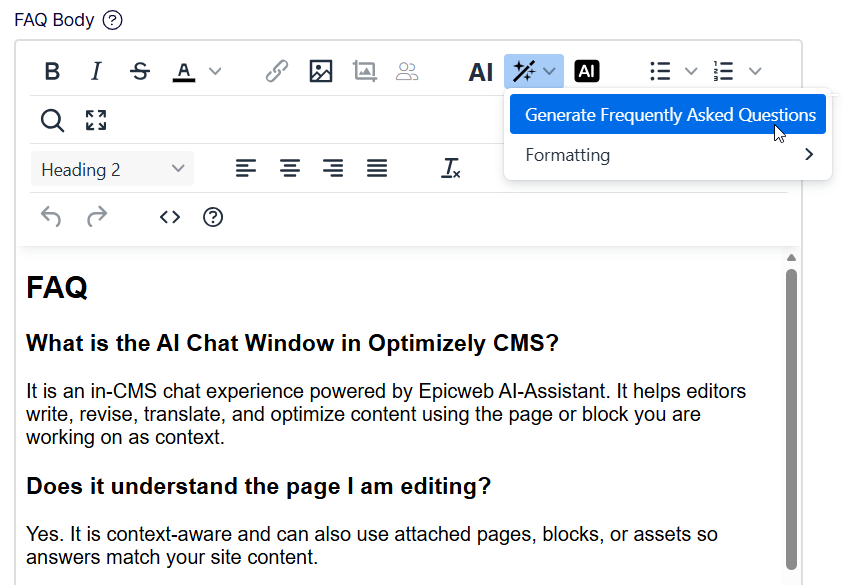
If a page explains a product, service, process or topic, the AI Assistant can analyze the page and generate relevant questions and answers based on the actual content. These answers can then be reviewed, adjusted and approved by the editor.
The result is content that is easier for answer engines and AI bots to understand and reuse.
This is not about keyword stuffing. It is about making your expertise clear enough to be selected as the answer.
What is GEO?
GEO stands for Generative Engine Optimization.
GEO goes one step further than AEO.
Where AEO focuses on direct answers, GEO focuses on helping generative AI systems understand the full context of your content. Generative engines do not only look for one short answer. They often build longer, more contextual responses based on multiple sources.
To support that, your content should include:
- A clear summary at the beginning
- Key takeaways
- Well-structured headings
- Short explanatory sections
- Consistent terminology
- Helpful facts, examples and supporting information
- Clear author, organization and topic signals
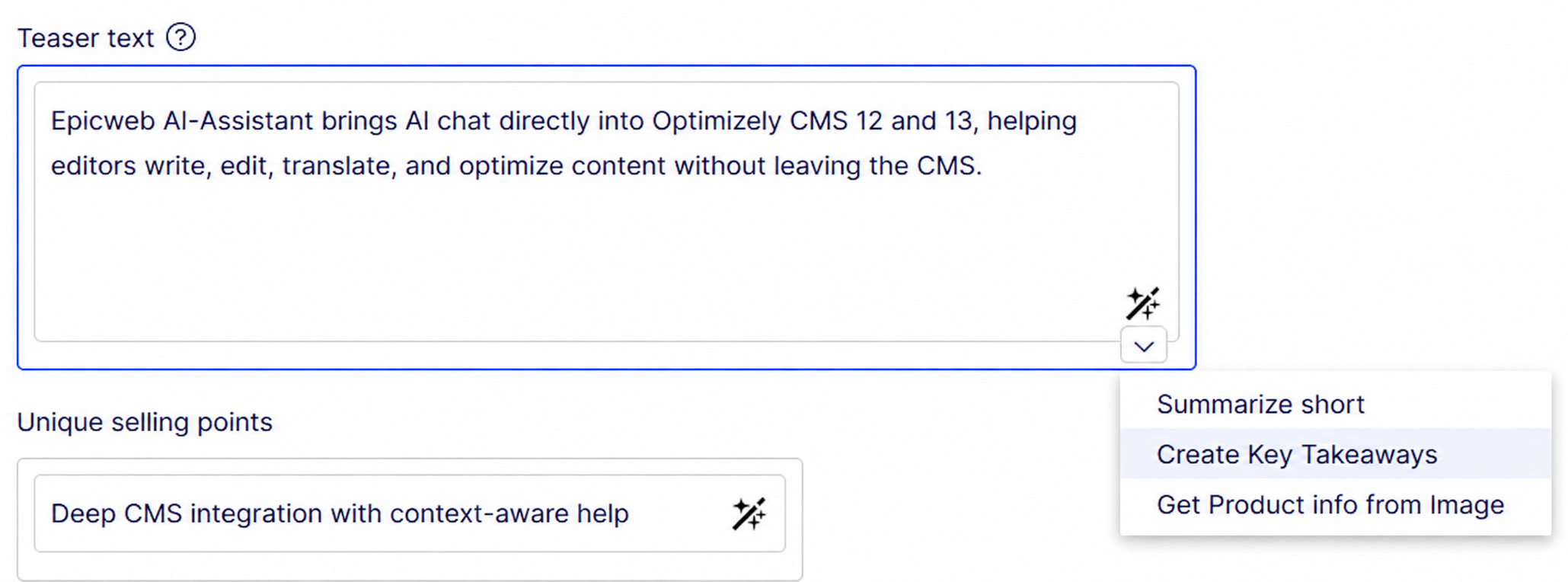
With Epicweb AI Assistant, editors can create these elements directly inside the CMS. The assistant can suggest a short introduction, generate key takeaways, improve structure and identify missing sections that would make the page more useful for both humans and AI systems.
In other words, GEO is about making your content easy to understand, easy to trust and easy to cite.
SEO is still the foundation
SEO is not going away.
In fact, SEO becomes even more important in an AI-driven search landscape, because many AI systems still rely on search engines, indexes, structured data and page signals to find and evaluate content.
If your content cannot be found, crawled and understood, it is unlikely to be used in AI-generated answers.
That is why SEO, AEO and GEO should not be treated as separate strategies.
They work together:
SEO helps your content get found.
AEO helps your content become the answer.
GEO helps your content become part of AI-generated responses.
Epicweb AI Assistant supports this combined workflow directly inside Optimizely CMS.
Working with SEO fields in Optimizely
One of the simplest ways to improve content quality is to make sure that all SEO fields are complete and relevant.
The AI Assistant can help editors generate:
- SEO titles
- SEO descriptions
- Keywords
- Image alt texts
- Page summaries
- FAQ content
- Metadata for different language versions
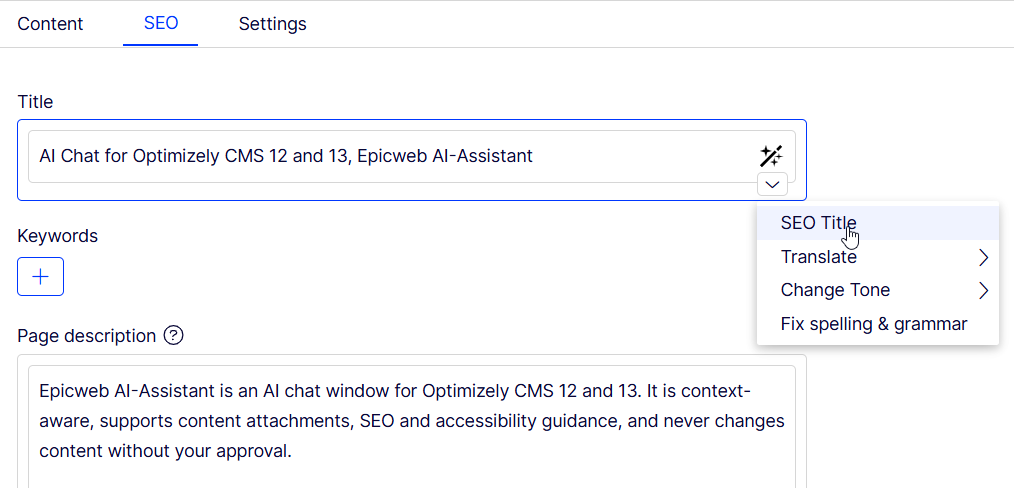
For example, the SEO title shortcut can analyze the page content and suggest a compelling title based on the actual page.
The SEO description shortcut can generate a concise meta description, typically around 150 characters, using wording that fits both the page and the current language context.
The assistant also respects field-specific instructions. For example, a keyword field can be configured so that the AI always returns a comma-separated list, regardless of how the editor phrases the request.
This gives editors speed, but also governance and consistency.
AI Chat changes the editorial workflow
The biggest improvement is the built-in AI Chat.
This is not just a generic chat window. It is a context-aware AI assistant inside Optimizely CMS.
It understands:
- The current page
- The page type
- The content structure
- The available fields
- The current language
- The editorial context
- The instructions configured for the site or template
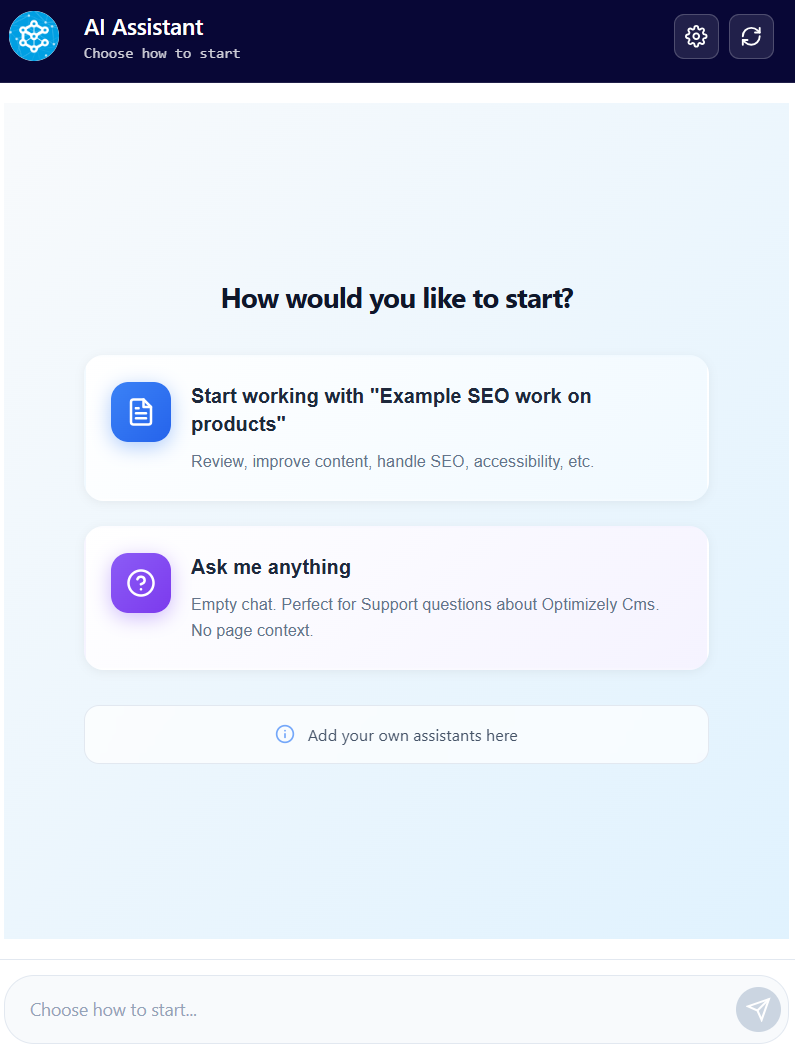
This means editors can ask questions such as:
Analyze all SEO fields on this page and suggest improvements.
The assistant can then inspect the fields, identify what is missing and present suggested values in a structured table.
For example, it can show that the SEO title, meta description, keywords or summary fields are empty, and then suggest suitable content for each field.
The editor can review the suggestions and update all fields in one go.
That is a completely new way of working in Optimizely.
Instead of manually checking field by field, the editor can work through a guided AI workflow, directly inside the CMS.
Creating FAQs for AEO
FAQ content is one of the most practical ways to prepare a page for AEO.
The AI Assistant can generate relevant questions and answers by analyzing the current page content. It can also retrieve content from a central Q&A hub and suggest questions that match the topic of the page.
This makes it easier to create answer-friendly content without leaving Optimizely.
Typical examples include:
- What is this product or service?
- Who is it for?
- How does it work?
- What are the benefits?
- What should the user know before getting started?
- How is this different from alternatives?
The editor remains in control and decides what should be added, changed or published.
Improving content for GEO
For GEO, the goal is to make the page easier for generative AI systems to understand and summarize.
The assistant can help editors add:
- A short summary at the top of the page
- Key takeaways
- Bullet point highlights
- Better headings
- More explanatory sections
- Clearer definitions
- Structured content blocks
- Consistent terminology across languages
This is especially useful for long-form articles, product pages, service pages, support content and knowledge base content.
A page that starts with a clear summary, contains structured sections and answers common questions is easier for both users and AI systems to understand.
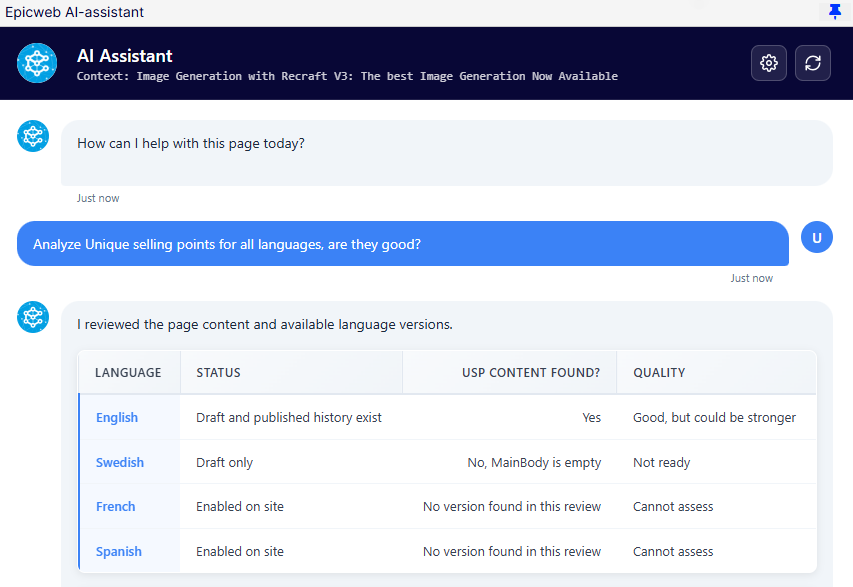
Working across language versions
Many Optimizely websites operate across several markets and languages.
That makes SEO, AEO and GEO more complex.
It is not enough to optimize the master language. Each language version needs strong metadata, relevant local wording, consistent structure and content that makes sense in that market.
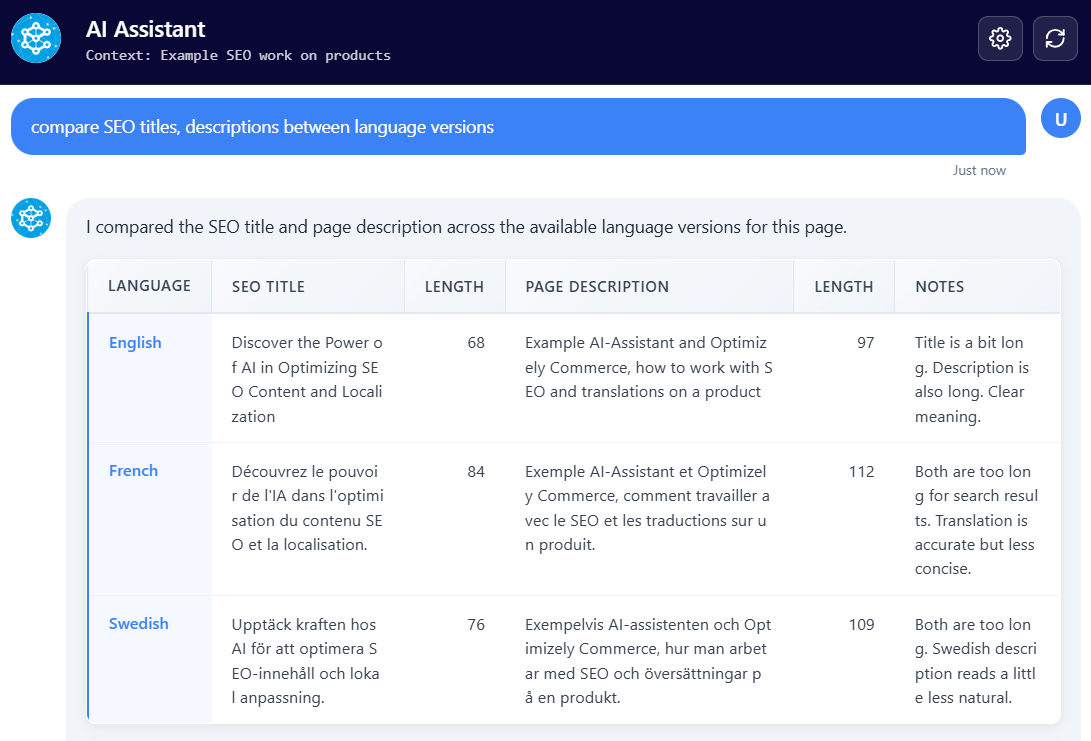
Epicweb AI Assistant can help editors compare fields across language versions and identify differences.
For example, the AI Chat can compare SEO titles, descriptions, summaries and FAQ content between language versions and highlight what is missing or inconsistent.
It can also help update multiple language versions with a single click.
This makes multilingual optimization much faster and helps maintain quality across markets.
Why structure matters
AI systems prefer content that is easy to understand.
That means editors should think beyond ordinary paragraphs.
Good AI-ready content often includes:
- Clear headings
- Short summaries
- Definitions
- Tables
- Bullet points
- FAQ sections
- Internal links
- Author and organization information
- Updated dates
- Structured metadata
This does not only help AI. It also improves the experience for real users.
When content is easier to scan, easier to understand and easier to trust, it performs better across both traditional search and AI-driven discovery.
Speed still matters
Content structure is important, but technical performance still plays a major role.
A slow website creates friction for users, search engines and AI crawlers.
Fast-loading pages are easier to crawl, easier to index and better for user experience. Combined with clear content structure, strong metadata and relevant answers, site speed becomes an important part of the full SEO, AEO and GEO strategy.
If you are running Optimizely CMS 12 or CMS 13 on a modern, well-optimized setup, you already have a strong technical foundation. The next step is to make sure the content itself is structured for the future of search.
A practical workflow for editors
A simple workflow inside Optimizely could look like this:
- Open the page in Optimizely CMS.
- Ask the AI Chat to analyze the content.
- Generate or improve the SEO title and meta description.
- Add a short summary for GEO.
- Generate key takeaways.
- Create relevant FAQ content for AEO.
- Review image alt texts.
- Compare language versions.
- Update the suggested fields.
- Review, approve and publish.
All of this can happen directly inside the Optimizely editing experience.
No copy and paste into external tools.
No disconnected AI workflow.
No guessing what the assistant knows about the page.
The assistant works with the actual CMS context.
The real value: quality and confidence
AI assistance is often described as a productivity tool, and that is true. Editors can work faster and handle more content.
But the bigger value is quality.
With Epicweb AI Assistant, editors get help creating content that is more complete, more consistent and better prepared for how search is evolving.
It helps teams:
- Reduce manual SEO work
- Improve metadata quality
- Create better FAQ content
- Support AEO and GEO workflows
- Improve multilingual consistency
- Strengthen accessibility with better alt texts
- Work directly inside Optimizely CMS
- Keep the editor in control
This is not just about writing faster.
It is about publishing with more confidence.
Conclusion
The future of search is not only about ranking.
It is about being understood.
Your content needs to be visible in search engines, selected by answer engines and useful for generative AI systems.
That requires a combination of SEO, AEO and GEO.
Epicweb AI Assistant makes this practical for every editor working in Optimizely CMS. It brings AI directly into the editorial workflow, understands the page context and helps editors improve content, metadata, summaries, FAQs and language versions without leaving the CMS.
Search is changing.
With the right structure, the right content and the right AI support inside Optimizely, your website can be ready for the AI-driven future of search.
Boka ett möte för att komma igång!
Vi erbjuder ett timmes introduktionsmöte om vår AI-assistent för Optimizely CMS 12. (Svenska eller engelska)
AI-assistenten: Det här får du
Funktionsrik för ökad redaktionell effektivitet
Epicwebs AI-assistent har en imponerande mängd funktioner:
-
Textförslag och alternativ: Förbättra ditt skrivande med AI-genererade formuleringar och alternativa varianter.
-
Flerspråkig översättning: Översätt din text sömlöst till flera språk samtidigt som formattering och stil bevaras för att nå en mångsidig publik.
-
SEO, AEO och GEO: Generera optimeringsinnehåll för sökmotorer och AI-sökning.
-
Prompt Pro Assistance: Det sparar tid och hjälper dig få mer ut av dina idéer, omedelbart.
-
Bild AltText-analysator: Avancerade AI-funktioner för att analysera bilder och automatiskt fylla i medieobjektsegenskaper.
-
Bildgenerering: Skapa relevanta och engagerande bilder som kompletterar ditt innehåll.
-
Bildtransformer: Ta vilken bild som helst, förbättra den och lägg till nya element med AI-driven kreativitet. Förändra sättet du interagerar med bilder.
-
Ny textgenerering: Generera nytt innehåll som håller din publik engagerad.
-
Textsammanfattning: Snabbt kondensera långa texter till koncisa sammanfattningar, spara tid och behålla essensen, perfekt för SEO-beskrivningar.
-
HTML-formatering: AI-assistenten erbjuder en rad formateringsmöjligheter inom Rich Text Editor. WCAG-kompatibel.
-
Stavningskontroll: Säkerställ att ditt innehåll är fritt från fel och professionellt polerat.
-
Tonaljustering och konsekvens: Anpassa din texts ton för att passa ändamålet och bibehålla en konsekvent varumärkesröst.
-
Nyckelordsutvinning: Identifiera och extrahera nyckeltermer från din text för SEO-optimering.
-
Anpassade uppmaningar med ChatGPT: Utnyttja kraften i ChatGPT för att köra egna uppmaningar för unik innehållsskapande.
-
Anpassade genvägsuppmaningar: Lägg till egna genvägar för frekvent använda kommandon, koppla verktyg och öka produktiviteten.
-
Inline ChatGPT-hjälp: Använd ChatGPT eller Google GEMINI direkt inom plattformen för omedelbar hjälp.
-
Verktyg för AI: Anslut dina C# Funktionsanrop eller MCP-verktyg direkt till AI-assistenten, vilket möjliggör anpassade integrationer.
-
RAG (Retrieval-Augmented Generation): Anslut din egen kunskapsbas för AI-svar som drivs av din organisations interna data.
Smidig integration i Optimizely
AI-assistenten är sömlöst integrerad i varje fält inom Optimizely CMS och Commerce-plattformen, vilket säkerställer att dessa kraftfulla funktioner är tillgängliga precis där du behöver dem, i redigerarläget.
Kom igång med Epicwebs AI-assistent:
För att komma igång med den kostnadsfria utvärderingen, fyll enkelt i formuläret på vår webbplats för att komma igång och ladda ner tillägget till din Optimizely CMS och anpassningsbara Commerce-plattform från Optimizely Nuget-feed.
Följ vår nybörjarvänliga guide eller dyka djupt med vår omfattande dokumentation.
Installation är snabb och enkel, vilket gör att du kan börja utnyttja kraften i AI-assistans på nolltid.
Boka ett möte för att komma igång!
Vi erbjuder ett timmes introduktionsmöte om vår AI-assistent för Optimizely CMS 12. (Svenska eller engelska)
Notera: Detta blogginlägg har förbättrats med hjälp av AI-assistenten för Optimizely.
About the Author